InMapz Navigator™ · Wayfinding Kiosks

Wayfinding and advertising — on the same kiosk.

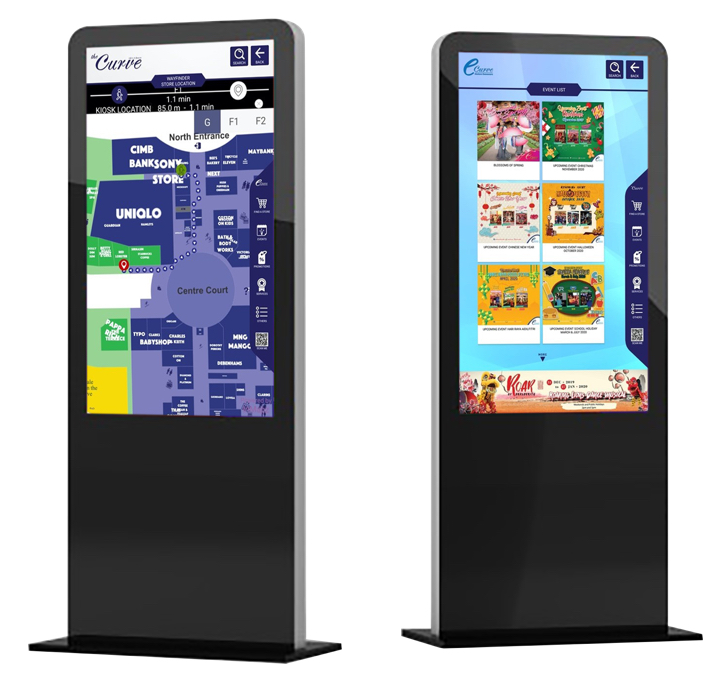
Navigator turns any standard touchscreen into a venue kiosk that does both: full-screen digital ads and turn-by-turn wayfinding to every store, gate, room, or attraction. Deploy in 30 days. Plans from free.

Android & Windows Works offline No multi-year contract
Deployed at malls, airports, hospitals, conventions & resorts
Customer Customer Customer Customer Customer Customer Customer Customer Customer Customer

Where every extra minute lost costs a sale or a flight.

Large venues with long sight lines and complex layouts. Visitors don't have time to ask three people for directions — and operators don't want them to.

For 01

Malls & retail centers

Help shoppers find stores faster. Promote tenant deals from the same screen. Tenants see traffic; landlords prove ROI on the directory.

For 02

Airports & transit

Get travelers to the gate, the lounge, or the rental counter without staffing more help desks. Push real-time ads keyed to dwell zones.

For 03

Hospitals & campuses

Patients and visitors find clinics, labs, and parking on their own. Cut down hallway questions and missed appointments.

One kiosk. Two revenue streams.

Most kiosks are either signage or wayfinding. Navigator runs both — independently or blended — and the analytics tie ad spend back to actual foot traffic.

Mode A

Digital advertising

Full-screen image and video ads with scheduled rotation. New creative pushed instantly across the fleet.

  • Image and video ad formats
  • Scheduled rotation of mixed creative
  • Instant publish across all kiosks
  • Touch analytics captured per ad
Mode B

Digital wayfinding

Interactive multi-floor maps with turn-by-turn walking directions and full-text search.

  • Multi-floor interactive maps
  • Stores, gates, rooms, restrooms, parking
  • Turn-by-turn walking directions
  • QR transfer of route to visitor's phone
or both, together

The kiosk follows them off the screen.

A visitor sees an ad on a Navigator kiosk, scans the QR, and walks away with the offer and the directions to redeem it cached on their phone — even if the venue has no signal.

1

Kiosk

Visitor taps an ad or searches a store on the Navigator kiosk.

2

Mobile

Scan the QR. The promo and route load on their phone instantly — no app install.

3

Offline

Route is cached. Visitor follows it to the store and redeems the offer, even with no signal.

K2M2O · Live
Kiosk
Mobile
Offline

Everything Navigator ships with, by default.

No modules, no per-feature pricing. Same web admin portal controls every kiosk in your fleet.

01

Search-first directory

Browse by name, category, or alphabet. Typo-tolerant full-text search across stores, gates, and amenities.

02

Image & video ads

Scheduled rotation of mixed creative. Push new ads to the entire fleet instantly from the web portal.

03

Turn-by-turn routes

Walking directions across multiple floors. Routes account for closures, accessibility, and shortcuts.

04

Events & promotions

Schedule events, surface them on kiosks, and link each one to a location on the map.

05

QR to mobile

Hand off any route or promotion to the visitor's phone. No app install required.

06

360° analytics

Touch interactions, ad impressions, search queries, and routes — tied back to ROI for operators and tenants.

07

Offline mode

Kiosks keep running where there's no Wi-Fi. Content syncs automatically when the connection returns.

08

Web admin portal

Configure kiosks, upload ads, schedule events, update store info — all from a single browser.

Runs on the kiosks you already buy.

Navigator is software. We don't sell screens. Use any standard Android or Windows touchscreen — we can recommend tested models for each venue type.

Android kiosks
FREE + PRO PLANS
Windows kiosks
PRO PLAN
Mobile via QR
NO INSTALL
Offline mode
NO WIFI NEEDED

Start free. Scale per kiosk.

No multi-year contracts. Hardware not included — Navigator runs on the kiosks you already use.

Free Plan
$0
Forever free · 1 kiosk license
  • Digital signage with unlimited ads
  • Android-based kiosks (hardware not included)
  • Web admin portal access
  • Static maps or floor plans
  • Forever free, no card required

Built for operators who measure foot traffic, not features.

01

30-day deployment

Turnkey. Send us your floor plans and brand. We handle the map build, content setup, and kiosk provisioning end-to-end.

02

One platform, every screen

The same map and content powers your kiosks, mobile web, and QR experiences — managed from one web portal.

03

ROI tenants can see

Touch analytics, ad impressions, and route data give landlords and tenants proof of where the kiosks actually drive traffic.

What operators ask before booking a demo.

What kiosk hardware does Navigator run on?
Navigator runs on standard Android and Windows touchscreen kiosks. Hardware is not included — we don't lock you into proprietary screens. We can recommend tested vendors and screen sizes for malls, airports, hospitals, resorts, conventions, and amusement parks.
Can one kiosk show both advertising and wayfinding?
Yes. This is the industry-first hybrid that defines Navigator. The same kiosk can show full-screen ads, full wayfinding, or a rotating mix. Operators control the split through the web admin portal.
What is K2M2O — Kiosk to Mobile to Offline?
Visitors scan a QR code on the kiosk to send a promotion or directions to their phone. They can then walk to the store and redeem the offer — even with no signal — because the route and content are cached on-device.
How long does deployment take?
Navigator is a turnkey solution that deploys in less than 30 days. Send us your floor plans and brand assets, and we handle the map build, content setup, and kiosk provisioning.
What does the Pro plan include?
The Pro plan is $199 per kiosk per month with no multi-year contract. It includes unlimited ads, both Android and Windows support, interactive wayfinding maps, mobile maps via QR, phone and email support, and all software and map updates.
Does Navigator work without internet?
Yes. Kiosks can run in offline mode with cached content where there is no internet connectivity, then sync analytics and content updates when reconnected.
What happens when my venue layout changes?
Send us the updated floor plan. We push the new map and re-routed paths to every kiosk in your fleet within days. No version-locked installs to push out at each location.

Bring a floor plan. Leave with a working kiosk demo.

Twenty minutes is enough to show you what your venue looks like as a Navigator kiosk — wayfinding, ads, K2M2O — before the call ends.

20 minutes · Live walkthrough · No commitment