InMapz Protector™ · School Safety Maps

When seconds count, everyone sees the same map.

InMapz Protector turns every school into a live safety map: evacuation routes, emergency equipment, and an incident command view shared by administrators, staff, and first responders — in real time, on every device.

Web · iOS · Android · Print No school IT required Trusted by 4+ unified districts
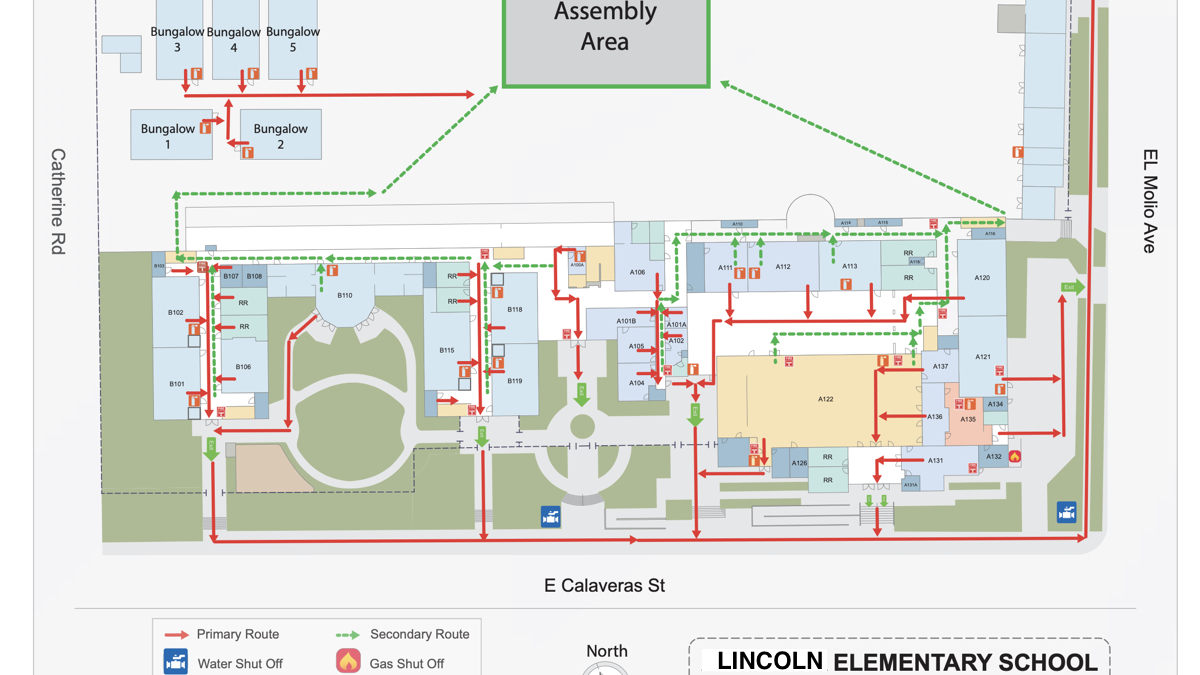
InMapz Protector evacuation map for Lincoln Elementary School showing primary and secondary routes, assembly area, and emergency shutoffs
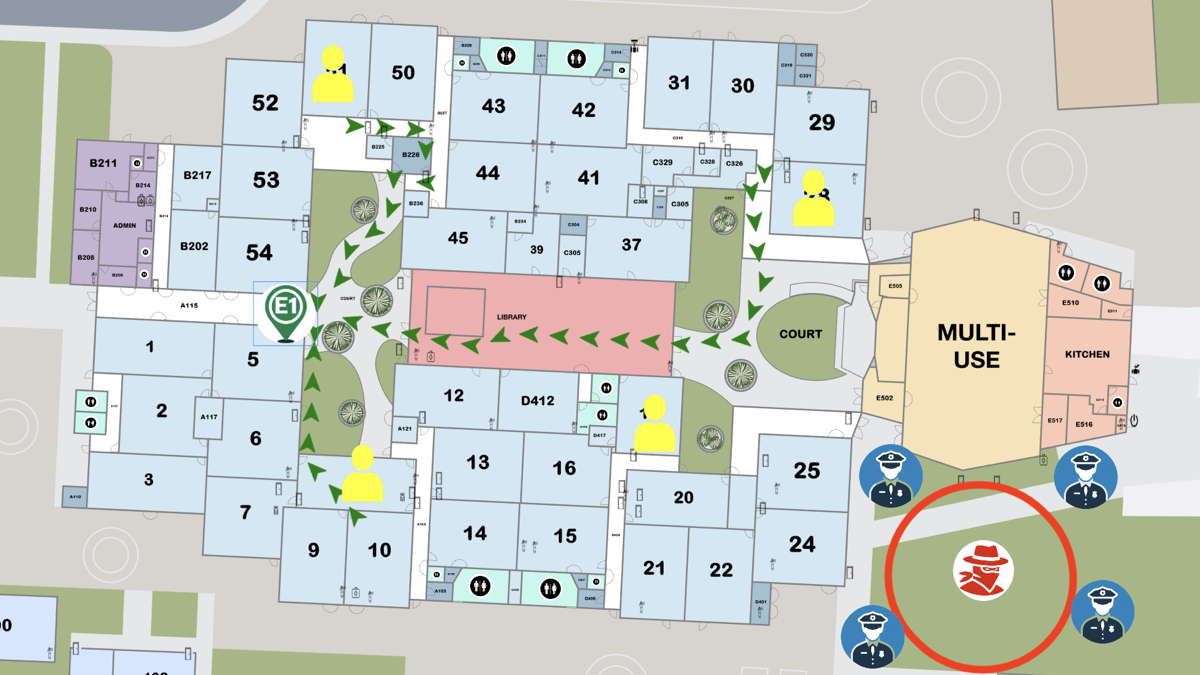
InMapz Protector active threat response map showing suspect location, staff positions, and law enforcement deployment
Trusted by unified school districts
Pasadena Unified
K-12 district
Stockton Unified
57 schools
Salinas Unified
K-12 district
Hayward Unified
K-12 district

Most schools still run drills on paper and posters.

Storms, fires, intruders — every real emergency is different than the drill. Static maps on the wall can't be re-routed when a hallway is blocked. And nobody on scene shares the same view as central command.

  • 01 Evacuation posters get outdated the day construction starts Stale info
  • 02 Substitute teachers don't know AED, exit, or shut-off locations Risk hours
  • 03 Primary route blocked — no plan for the secondary Bottleneck
  • 04 First responders arrive with paper maps; admins have a different one No common view
  • 05 Audit time: nobody can prove the equipment inventory is current Liability

One live map. Same picture for everyone on scene.

Routes re-plan when a hallway is blocked. Substitutes find AEDs the same way veterans do. The principal, the SRO, and the responding fire captain all watch the same evacuation status update in real time — instead of comparing paper printouts.

30 days
From kickoff
to district live
All sites
Web, mobile,
print, kiosk
1 view
Shared with
first responders
Map our district

Three safety layers on top of every floor plan.

Each layer ships on day one — and updates together as your campus changes. No separate systems, no version drift, no IT install on classroom devices.

Pillar 01

Evacuation maps

Every classroom gets a "you are here" marker and a primary and secondary route to assembly. Routes re-plan when a hallway is blocked. Print to binders, post on walls, or open on a phone — same source of truth.

  • Primary & secondary routes per room
  • Re-routable when blocked
  • Printable, mobile, and web versions
  • Updated in days, not years
Pillar 02

Emergency equipment maps

AEDs, exits, alarms, safety shelters, gas and water shut-offs, backup power. Pinned on the map, browsable on any device. Substitutes and new staff find them the same way as veterans.

  • AEDs, exits, alarms, shutoffs
  • Searchable by name or zone
  • Inspection history per asset
  • Audit-ready inventory reports
Pillar 03

Incident Command dashboard

One shared view for administrators, school resource officers, and external first responders. Mark rooms cleared, flag hazards, broadcast updates. Everyone on scene works from the same picture instead of separate printouts.

  • Live status per room and zone
  • Shared with first responders
  • Role-based access controls
  • Post-incident audit log

From daily drills to actual emergencies.

The map that powers Tuesday's fire drill is the same one administrators open when something real happens. No second system to remember under stress.

01

Fire & evacuation drills

Run, log, and report compliance drills with route timing and room-clear status.

02

Lockdown & shelter-in-place

Show safe rooms, lockable zones, and shelter assignments. Update in real time.

03

Storms & power events

Map backup power, generators, and storm shelters. Re-route around damaged areas.

04

Safety equipment audits

Inventory AEDs, fire extinguishers, and alarms. Track inspection dates per asset.

05

Substitute & new-staff orientation

Hand a sub a phone link. They see your school the way a veteran teacher does.

06

First-responder pre-planning

Share floor plans with fire and police in advance. Pre-stage routes, hazards, and access points.

07

Posted egress map signs

Brushed-aluminum signage at exits, stairwells, and elevators. Weatherproof, anti-glare.

08

Compliance & reporting

State-mandated drill logs, equipment inspection records, and incident archives in one place.

"

57 schools, one safety map: Stockton Unified standardized emergency response in a single year.

Stockton Unified rolled out InMapz Protector across all 57 elementary, middle, and high schools. Each campus mapped its critical safety equipment, published primary and secondary evacuation routes, and connected administrators to a shared incident command view used by first responders.

Read more customer stories
57
Schools mapped
across the district
100%
Classrooms with
primary & secondary routes
1 year
District-wide rollout,
kickoff to go-live

Print it. Pull it up on a phone. Same map.

Update once at the district level. Every classroom, every device, every staff phone reflects the new version — including printable binder pages and posted aluminum signage.

Web
iOS
Android
Print

Built for school operations, not for IT projects.

01

30-day deployment

We map every school in your district within 30 days of kickoff. No hardware to install, no software to push to staff devices. Cloud-based from day one.

Turnkey
02

SOC 2 & ISO 27001

School floor plans and safety data are sensitive. Encrypted at rest and in transit. Role-based access for admins, staff, and first responders. Audit log on every change.

Certified secure
03

Your district owns the maps

Unlimited export of your maps, routes, and inventory data. No lock-in. If you ever switch vendors, the maps you built leave with you.

No lock-in

What district teams ask before the demo.

How long does it take to deploy across a district?
Most districts go live within 30 days. We map every school, inventory critical safety equipment, and publish evacuation routes to web, mobile, and print without requiring any IT installs at the school sites. Staff log in from a browser the same day they're trained.
Do teachers and staff need to install anything?
No. The same map runs on web, iOS, and Android, plus printable versions for binders and classroom walls. Staff open it like any web page. There is no app to install, no software to push, and no IT setup at the school. New staff get a link.
Is the platform secure for school-environment data?
Yes. InMapz is SOC 2 Type II and ISO 27001 certified. Floor plans and safety inventory data are encrypted at rest and in transit, with role-based access for administrators, staff, and first responders. Every change has an audit log.
Can first responders access the maps during an incident?
Yes. The Incident Command dashboard shares the live map and equipment locations with administrators, school resource officers, and external first responders during an event — so everyone sees the same picture instead of relying on paper printouts. Access can be pre-staged with local fire and police before an incident.
What happens when a school adds a building or remodels?
Send us the updated floor plan. We push the new map and re-routed evacuation paths to all devices within days. There are no new versions to install — every device pulls the current map. Posted aluminum signage can be re-issued separately on the same schedule.
Do you sell the egress map signs separately, or only with the platform?
Brushed-aluminum egress map signs are available with the platform subscription. They're weatherproof and anti-glare, sized for posting at exits, stairwells, elevators, and assembly points. The signs reflect the same routes published in the live system, so the wall and the phone never disagree.
See your district on a live safety map.

Bring a floor plan from one of your schools. We'll show you the evacuation map, equipment inventory, and incident command view before the call ends.

20 minutes · Live walkthrough · No commitment